

Starbridge’s Email Digest keeps you updated on new signals entering “My Feed” - helping you stay on top of opportunities without constantly checking the platform.Documentation Index
Fetch the complete documentation index at: https://hc.starbridge.ai/llms.txt
Use this file to discover all available pages before exploring further.
What’s in the digest?
Whether you receive it daily or weekly, each email digest will have the following components:- Summary: Breaks down net new signals (new as of this digest), saved signals (signals you previously marked as Saved), and signals that need action (can include signals from previous digests you haven’t reviewed yet).
- Breakdown by type: A table with bridge types and signal counts (for example, Meetings vs RFPs vs Custom Web Signals).
- Sections for each bridge:
- At the top: number of net new signals for that bridge
- A card for each signal with key information
- A button to open Starbridge filtered to those exact signals
- Footer customization link: A footer link to customize your email digest.
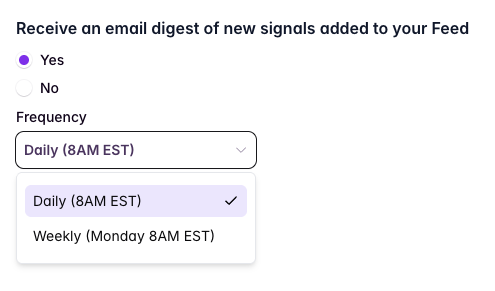
Set Your Email Frequency
Customize your Email Digest’s Contents
Your Email Digest and Feed contain the same information — read here to learn how to customize your feed, which will also customize your email digest.Troubleshooting
I’m not receiving emails
- Check your spam/junk folder
- Verify your subscription status within “Configure my feed”
- Confirm your email frequency is set (Settings → Feed & Email Digest)
I’m receiving too many emails
- Adjust your Territory filters to focus on specific accounts
- Switch from Daily to Weekly digest
- Hide lower-priority bridges from your feed and email digest
My emails are empty or missing sections
- Only new signals trigger emails; if no new data has been added since the last digest, you won’t receive an email
- Check that your Territory filters aren’t excluding all results